A Perfect Potluck alternative that also handles RSVPs and dietary needs
Perfect Potluck is worth using if you want a free, no-account dish sign-up sheet and nothing more. Its own help page says it has no RSVP feature, and that once a category is claimed the coordinator cannot rename or delete it, so a miscount or a wrong label sticks for the whole event. Switch when you also need RSVPs, dietary needs visible to whoever is cooking, or a way to keep the recipes people actually brought. GetLadle covers all three on one event link, and events are free on every plan.
Perfect Potluck is a fine dish list. It isn't an RSVP tool, and its own help page says so.
What Perfect Potluck does well
Perfect Potluck is exactly what its name says: a free, single-purpose dish sign-up sheet. Its help page confirms it plainly — "Yes, absolutely free!" — and guests never need to create an account; the coordinator is identified by email address instead. Setting up a schedule is a one-page form, and participants pick a category and add their name.
For a small, informal potluck where the only job is stopping everyone bringing the same dish, that simplicity is the whole point. There is nothing to configure beyond the categories themselves.
Where people run into trouble
Perfect Potluck's own help page documents three limits worth knowing before you build a schedule around it:
- No RSVP feature. The site has no dedicated way to track who is coming, only who is bringing what. Coordinators work around this by adding an informal "RSVP" category and asking people to sign up under it.
- Categories lock once claimed. "Once someone has signed up under a category, the coordinator cannot change the title of the category or delete it altogether." A typo or a menu change after the first sign-up is permanent for that event.
- No way to duplicate a schedule. There is no repeat-event feature: "if you want to create a schedule, you will need to complete the brief one-page form each time," for every recurring potluck.
None of this is hidden or spun. It is stated plainly on the vendor's own help page, which is unusually honest for a product to publish about itself.
How GetLadle compares
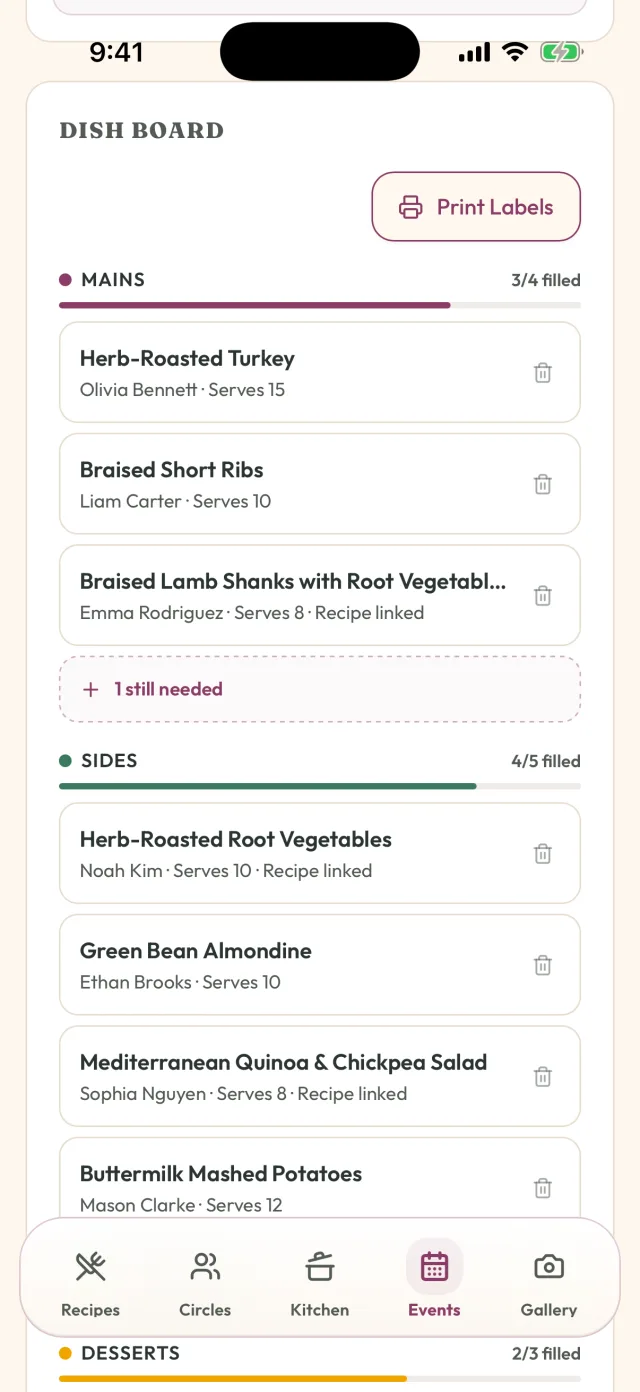
GetLadle builds RSVPs, dish claiming, and dietary needs into the same event link, rather than treating dish sign-up as the whole job. Guests RSVP and claim a dish slot on one page; once claimed, the slot shows as covered for everyone else. Dietary needs are collected on that same page and are visible to the host and to whoever is cooking a given dish — tracked at the recipe level, not just per person, so a host can check whether one specific dish is safe without messaging every guest individually.
Events are included on every GetLadle plan. The free Apprentice plan covers up to 25 guests per event, with unlimited events; Sous Chef and Head Chef cover 25 guests. Feast Mode, a one-time $59.99 CAD add-on that stacks on any plan, removes the guest cap entirely and adds a food-and-jobs board and reusable event templates — useful for a recurring potluck series, which Perfect Potluck's own help page says it cannot do.
Who should choose which
Choose Perfect Potluck if the event is small, informal, and the only problem you are solving is duplicate dishes — you do not need RSVPs, dietary tracking, or a repeatable schedule.
Choose SignUpGenius if you need broader volunteer sign-ups beyond food — shifts, supplies, non-food roles — with built-in reminders and waitlists.
Choose GetLadle if you want RSVPs, dish claiming, and dietary needs on one link, plus the recipes people actually brought kept somewhere after the event.
How we compared: We checked each product's own site or help page for pricing, RSVP and dish-management behaviour, and dietary-need handling, and used only limits documented by the vendor itself or in a sourced review.
| Product | Best for | Strengths | Limits | Pricing note |
|---|---|---|---|---|
| Perfect Potluck | A single free dish sign-up sheet with no account needed for guests | Free with no account required for guests; Coordinator identified by email — no login setup | No dedicated RSVP feature; Category name can't be changed or removed once claimed; No way to duplicate a schedule for a recurring event | Free |
| SignUpGenius | Volunteer and event sign-ups beyond food, with reminders and waitlists | Free to start, no account required for participants; Automatic reminders and built-in waitlists | No recipe or dietary layer for what's actually in each dish | Free plan available |
| GetLadle | Potlucks that also need RSVPs, visible dietary needs, and the recipes kept afterward | RSVP and dish claiming on one event link; Dietary needs visible to the host and whoever is cooking; Recipe attached to each claimed dish; Reusable templates for recurring events with Feast Mode | Has an iPhone app and a web app; Android is still in development, so there is no Android app yet | Events free on every plan; Feast Mode adds unlimited guests for $59.99 CAD one-time |
Frequently asked questions
Does Perfect Potluck have an RSVP feature?
No. Perfect Potluck's own help page says it has no dedicated RSVP feature. Coordinators typically work around this by adding an informal category people sign up under just to indicate they're coming.
Can I edit a Perfect Potluck category after someone signs up?
No. Once a guest has signed up under a category, the coordinator cannot rename or delete it, according to the site's own help page. Decide your categories before you share the link.
Is GetLadle free to use for a potluck?
Yes. Events are included on every GetLadle plan, including the free Apprentice plan, which covers up to 25 guests. Sous Chef and Head Chef cover 25 guests, and Feast Mode removes the guest cap for a one-time $59.99 CAD.
Can I reuse a GetLadle event for a recurring potluck?
Yes, with Feast Mode's reusable event templates. Perfect Potluck's own help page says schedules can't be duplicated, so a recurring potluck there means filling in the form from scratch every time.
Related
- How to plan a potluck without duplicate dishes
- What to Bring to a Potluck: Ideas That Actually Travel
- GetLadle for Potlucks
- Meal Train alternative with dietary needs built in
- GetLadle for Church Potlucks
Sources
Last reviewed 2026-09-15 · GetLadle