The best potluck sign-up apps, compared by what guests actually do
For most potluck hosts, GetLadle is the strongest overall pick: guests claim a dish and can attach the recipe they are making, dietary needs sit on the same page, and events stay free on every plan. SignUpGenius is the best free, most established option if ads don't bother you. Perfect Potluck is the simplest: genuinely free, no account, one job done well. Google Sheets or Forms works with zero setup if your group already lives in Google, but nothing stops duplicates for you. Evite suits a nice-looking invitation more than dish coordination, and its free tier caps how many guests you can message before you pay.
A tool built around dish claiming beats a general invitation or spreadsheet tool once dietary needs and duplicate dishes are the actual problem.
SignUpGenius: best free, most established
SignUpGenius is the tool most people have already used for a school, church or office sign-up. It's free to start, participants don't need an account to claim a slot, and it sends automatic reminder emails so a claimed slot doesn't get forgotten. The trade-off, visible on the free plan itself, is ads on the sign-up page — paid plans exist mainly to remove them and raise limits. It has no concept of a recipe or a dietary need; it manages slots, not food.
Perfect Potluck: best for simplicity
Perfect Potluck does one job and nothing else: a free, no-account sign-up sheet for a group meal. It's genuinely fast to set up. Its own help page is candid about the trade-offs: there's no RSVP feature, a coordinator can't rename or delete a category once someone has claimed it, and there's no way to duplicate a schedule for a recurring potluck (say, a monthly office lunch). If you want a single sheet for a single event and nothing more, it's hard to beat for simplicity.
Google Sheets or Forms: zero setup, manual policing
If your group already coordinates in Google, a shared Sheet or Form costs nothing and needs no new account. The honest limit is structural: it is a general-purpose spreadsheet with no concept of a potluck category cap. It won't stop a ninth turkey being added once the mains category is full, and it won't remind anyone the potluck is Thursday. You are the safeguard against duplicates, not the tool.
Evite: built for invitations, not dish coordination
Evite is an invitations and RSVP platform with a basic sign-up sheet feature bolted on. It's the right choice when the priority is a well-designed invite people actually open, and event pages are always free. It is not built around dish claiming or dietary tracking, and several Trustpilot reviewers describe being charged to send invites beyond an initial free batch, with Evite Pro priced at $249.99 a year for unlimited premium designs.
Where GetLadle fits
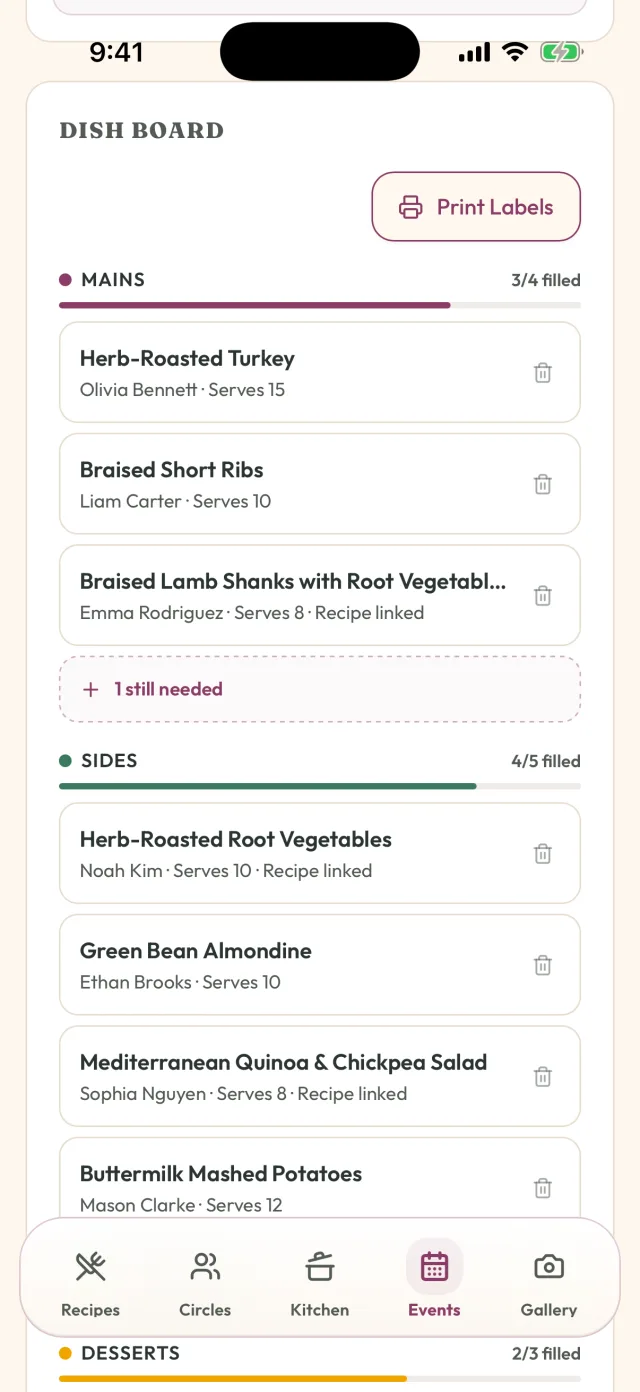
GetLadle is built specifically for the problem a potluck host has: who's bringing what, is it safe for the people with allergies, and what actually got cooked. Guests claim a dish from the event page and can attach the recipe they're making, so the claim isn't just a word in a box — the host can see the actual ingredients. Dietary needs are collected on the same page, visible to the host and to the people cooking, not buried in a separate thread. Events are included on every plan, including the free Apprentice tier, which allows up to 25 guests per event. Sous Chef and Head Chef allow 25 guests, and the one-time Feast Mode add-on makes the guest count unlimited on any plan.
The honest limit: GetLadle has an iPhone app on the App Store and a web app, but Android is still in development, and it doesn't have the fifteen-year track record SignUpGenius or Perfect Potluck have with large recurring groups.
Who should choose which
Choose SignUpGenius for a large, recurring, less tech-comfortable group that just needs slots and reminders. Choose Perfect Potluck if you want the smallest possible free tool for one event. Choose Google Sheets if your group already lives there and you're willing to check for duplicates yourself. Choose Evite if the invitation design matters as much as the food. Choose GetLadle if you want the dish list, the dietary needs, and the actual recipes in one place, with a record of the meal kept afterward.
How we compared: We compared each tool on what a potluck host actually needs, not on feature-list length: how much friction a guest faces to respond (an account vs. a link), whether claiming a dish removes it from the list so duplicates actually stop, whether dietary and allergy needs are collected where the cooks can see them, and what it costs the host and the guests. A tool that solves dish coordination and dietary visibility together ranks above a tool that only handles invitations or a blank spreadsheet that relies on the host to police it.
| Product | Best for | Strengths | Limits | Pricing note |
|---|---|---|---|---|
| SignUpGenius | Large or recurring groups — church, school, office — who want a free, no-login sign-up with reminders. | Free to start, no credit card required; Guests can claim a slot without creating an account; Automatic reminder emails; Waitlists and per-slot quantity limits | Ads appear on sign-up pages on the free plan; paid plans are needed to remove them; No dish-to-recipe or dietary-need layer | Free to start; paid plans remove ads and raise limits (specific prices weren't shown on the pages we could access). |
| Perfect Potluck | Hosts who want the simplest possible free sign-up sheet and nothing else. | Completely free, no account needed to sign up; Set up in under five minutes by the site's own description; Automated reminder emails; Portion calculators for 10 to 500+ guests | No RSVP feature, per its own help page; A category can't be renamed or deleted once someone has signed up under it; No way to duplicate a schedule for a recurring potluck | Free. |
| Google Sheets / Forms | Groups that already live in Google and want zero setup. | Free with any Google account; Real-time collaborative editing; Fully customizable to any format; Works offline once loaded | No built-in way to cap a dish category or block a duplicate entry — the host has to check it by hand; No reminders or claim-locking; it is a general-purpose spreadsheet, not a potluck-specific tool | Free with a Google account. |
| Evite | Friend and family gatherings where a designed invitation and RSVP tracking matter more than dish coordination. | Free digital invitations and always-free event pages; Built-in RSVP tracking and automated reminders; A basic sign-up sheet feature for simple task coordination; Evite Pro at $249.99/year for unlimited premium designs | Not built around dish claiming or dietary tracking; Free tier invite volume is capped; multiple Trustpilot reviewers report being charged to send beyond an initial batch of invites | Free basic invitations and event pages; premium designs and larger sends cost extra; Evite Pro is $249.99/year. |
| GetLadle | Hosts who want the dish list tied to a real recipe, dietary needs visible where the cooks can see them, and a record of the meal kept afterward. | Events are included on every plan, including the free Apprentice tier; Guests claim a dish and can attach the recipe they're making, so the host sees what's actually in it; Dietary needs are collected on the event page, visible to the host and the people cooking; Free-tier events allow up to 25 guests; Sous Chef and Head Chef allow 25; the one-time Feast Mode add-on removes the guest cap on any plan | Has an iPhone app and a web app; Android is still in development, so there is no Android app yet; Newer product with a smaller track record than SignUpGenius or Perfect Potluck | Free forever tier with events included; Sous Chef $5.99 CAD/mo ($49.99/yr); Head Chef $11.99 CAD/mo ($99.99/yr); Feast Mode adds unlimited event guests for $59.99 CAD one-time. |
Frequently asked questions
Is SignUpGenius or Perfect Potluck better for a potluck?
Perfect Potluck is simpler and has no participant ads; SignUpGenius has more structure (waitlists, reminders, payment collection) but shows ads on the free plan. Neither tracks dietary needs or connects a dish to a recipe.
Can I just use a Google Sheet for a potluck sign-up?
Yes, and it costs nothing if your group already uses Google. The trade-off is that a sheet has no built-in way to cap a dish category or block a duplicate entry — it's a general-purpose spreadsheet, not a potluck tool, so you have to check it by hand.
Does GetLadle work for a potluck that isn't a church or office event?
Yes. GetLadle events are for any gathering — family dinners, friend groups, holidays. Guests RSVP, claim a dish, and can attach the recipe so the host knows what's actually in it.
Are GetLadle potluck events really free?
Yes. Every GetLadle plan, including the free Apprentice tier, includes events. The free tier allows up to 25 guests; Sous Chef and Head Chef allow 25; the one-time Feast Mode add-on removes the guest cap on any plan.
Related
- Best Meal Train Websites Compared for 2026
- How to Coordinate a Potluck Without Duplicate Dishes
- GetLadle vs SignUpGenius
- GetLadle for Church Potlucks
- The Best Potluck Planning App in 2026: An Honest Guide
Sources
Last reviewed 2026-09-15 · GetLadle